



Hi, I'm Jen! I'm a personal finance expert and money coach aiming to help you take control of your money. I went from being broke to a six-figure net worth and am now on track to be financially independent at age 40. Discover Jen's story
In this CheckoutSmart app review, I am investigating the receipt-scanning app CheckoutSmart. With rising grocery prices rising, it is now even more important to find ways to save.
Bonus points if they are easy and low effort.
CheckoutSmart promises cashback on your grocery shopping. But does it really deliver? Read this CheckoutSmart app review to find out.
CheckoutSmart App Review
CheckoutSmart is a grocery cashback app. You can buy products advertised on the app and get a proportion of the purchase price back.
This can help you save money on your grocery shopping.
What Is CheckoutSmart?
CheckoutSmart is an iPhone and Android app that gives users cashback on grocery shopping. It is also one of the best receipt-scanning apps.
Essentially, users buy items advertised on the app, scan in the receipt, and receive a proportion of the purchase price back.
CheckoutSmart was founded by Paul Lees and Chris Howarth in 2012. The company is based in London and aims to reduce the cost of grocery shopping.
Is CheckoutSmart Legit?
CheckoutSmart is a legit company and not a scam. In the UK, it is a registered company with the number 8209876.
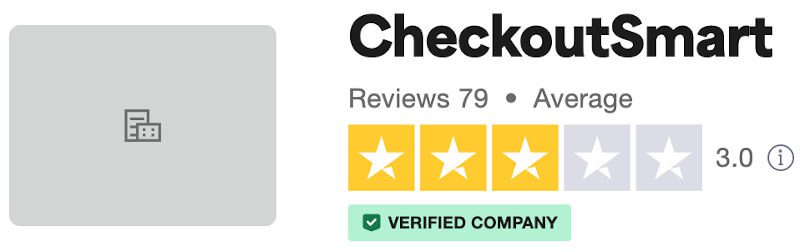
While CheckoutSmart is not well-known, there are some entries on Trustpilot.
Over there, CheckoutSmart has an average score of 3.0 out of 5.0. Overall, 57% of users rated Trustpilot as great or excellent. The negative reviews are mostly about a lack of offers.
What Is Trustpilot?
Overall, there are over 120 million reviews on Trustpilot. This means you can generally get a good understanding of the legitimacy and customer-friendliness of a company.
How Does CheckoutSmart Work?
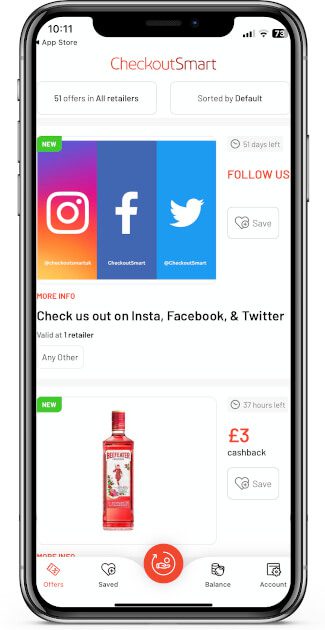
CheckoutSmart is free to use. On the app, you can see products that are on offer. Then, when you buy one of these products, you can take a picture of your receipt with the CheckoutSmart app.
You will then accrue cashback, as advertised on the app. Once you have reached £1 of cashback, you can cash out. For subsequent payments, the minimum threshold is £5.
Cash-out options include PayPal and BACS bank payment. Overall, CheckoutSmart works similarly to other cashback apps, including Shopmium.
How to Sign up
Signing up to CheckoutSmart is free and easy. Simply download the app from the App Store or Google Play. Then, you can create an account with your email address and password.
There are no additional steps needed at this point. When you want to cash out, you will be asked for your bank details or PayPal address.
How to Claim Cashback
Before you head for the shops, have a look at the CheckoutSmart app to see what is on offer. You can tap on a product to get more details, including what size and flavour to buy.
Once you are back from the shops, go to the “Request Cashback” section. Select the store you shopped at and the product you bought.
You can either choose the product from the list or scan the barcode. Then simply claim your cashback.
Note that you have to request cashback within seven days of making the purchase. From the time of the request, it can take up to 14 days until your cashback is credited.
What Offers Are Available on CheckoutSmart?
At the time of writing this CheckoutSmart app review, there are 51 offers available. These offers change from time to time so it is worth checking the app regularly.
There are offers for all major UK supermarkets, although not all offers are available at all supermarkets.
| Supermarket | Number of Offers |
| Asda | 13 |
| Morrisons | 7 |
| Sainsbury’s | 12 |
| Tesco | 29 |
| Waitrose | 1 |
Apart from supermarkets, there are also a few offers for food delivery services and other high-street shops. Though these offers are very limited.
Pros and Cons of CheckoutSmart
CheckoutSmart App Review Pros
- Free to use
- Low minimum payout
- Helps you save money on groceries
CheckoutSmart App Review Cons
- Not a lot of offers are available
- It takes a while for new offers to be added
- The app may be a waste of space if you are not interested in the offers available
- No friend referral scheme
Frequently Asked Questions
Is There a CheckoutSmart Promo Code?
Although the app has a section to enter a reward code, there are currently no promo codes. The codes that you can find online are not working at the moment.
CheckoutSmart also does not have a friend referral scheme.
How Does CheckoutSmart Make Money?
CheckoutSmart receives money from companies to advertise their products on the app.
Producers hope that you buy a discounted product through the CheckoutSmart app and like it so much that you will buy it again. However, there is no obligation for you to do so.
How Much Can You Save With CheckoutSmart?
Overall, there are not a lot of offers on the app and most will likely not be relevant to you. Thus, CheckoutSmart will not be able to significantly reduce your grocery bill.
However, it is a nice little help. If you use the app frequently, you can maybe save around £5 per month. Of course, this depends on how much you regularly spend on groceries.
One benefit of CheckoutSmart is that it can be stacked with other money-saving apps. Examples are JamDoughnut and Shoppix.
You can read more in JamDoughnut review and my Shoppix review.
CheckoutSmart App Review Summary
CheckoutSmart is a grocery cashback app. When you shop at a supermarket, you can scan the receipt and get a proportion of the purchase price back for selected items.
Overall, there are not a lot of offers on CheckoutSmart. However, as the app is free to use, it is worth downloading to see if it helps you save money.
If you need further information, you can have a look at CheckoutSmart’s terms.
If you like this post, please help My Money Yard grow by sharing it with your friends.