



Hi, I'm Jen! I'm a personal finance expert and money coach aiming to help you take control of your money. I went from being broke to a six-figure net worth and am now on track to be financially independent at age 40. Discover Jen's story
In this Microsoft Rewards review, you will learn how you can make money from using Microsoft products.
Many people use Bing but are unaware that they are missing out on an opportunity to get rewarded.
Even if you do not use Bing, knowing that web searching can pay you, may shift your opinion on using Microsoft’s search engine. But is it worth joining Microsoft Rewards?
Read this Microsoft Rewards review to find out!
Microsoft Rewards Review
Microsoft Rewards is a reward program for Bing users and Microsoft Store customers. You can earn points from searching with Bing or buying from Microsoft’s store and exchange them for gift cards.
Overall, the earning potential is low but using the scheme is largely passive.
What Is Microsoft Rewards?
Microsoft Rewards is Microsoft’s loyalty scheme. It awards you points for using Bing and other Microsoft products, for example buying games on your Xbox.
Points can then be used to buy gift cards.
Microsoft Rewards was first launched as Bing Rewards in 2010. In 2013, the Bing Rewards program was simplified and subsequently renamed.
What Is the Difference Between Microsoft Rewards and Xbox Live Rewards?
Xbox Live Rewards, also called just Xbox Rewards, was Microsoft’s reward program for Xbox users. Xbox Live Rewards were awarded for purchases, including games and movies, on the Xbox.
In 2018, the Xbox Live Rewards program was stopped and integrated into Microsoft Rewards.
You can still get rewarded for purchases on your Xbox, just that you will get Microsoft Reward points now.
Microsoft Reward points awarded from your Xbox purchases can be redeemed the same way as points earned from searching with Bing.
Is Microsoft Rewards Free?
Microsoft Rewards is free to use. You can simply join it with your existing Microsoft account or create a new account and then join.
If you are not signed up and plan to buy something from the Microsoft Store, you should definitely join the Rewards program first.
This is because you get points for every purchase you make.
Is Microsoft Rewards Legit?
Microsoft Rewards is legit and not a scam. Everyone knows Microsoft but few people have heard of Microsoft Rewards.
This often leads to the assumption that Microsoft Rewards is a scam.
However, it is absolutely part of Microsoft. You can find its section on the Microsoft website.
How Does Microsoft Rewards Work?
Microsoft Rewards is a rewards program. You can join from your Microsoft account and start earning points for web searches and completing other tasks.
Once you have accumulated sufficient points, you can cash out in the form of gift cards.
Signing up
There is no special sign-up required. You can join Microsoft Rewards by navigating the Rewards section of your account. You should see it as an option in the top menu.
Getting Paid
You can cash out once you have accumulated a minimum of $2 (2000 points). Though for some options, you may need a higher minimum amount.
Some popular gift cards include:
| Brand | Minimum Points Required | Minimum Cashout Value |
|---|---|---|
| Amazon | 7500 | €5 |
| Xbox | 2000 | €2 |
| Asos | 15,000 | €10 |
| Deliveroo | 7500 | €5 |
| H&M | 15,000 | €10 |
| Apple eGift | 7500 | €5 |
| Spotify | 15,000 | €10 |
Instead of cashing out, you can also donate your points. To automatically donate your points, turn on “Give With Bing” in your setting.
This option is only available in the UK, Canada, Australia, France, Germany, Italy, Spain, and the US.
What Are the Microsoft Rewards Levels?
When you use Microsoft Rewards, there are three levels. New users start at level one. You can then level up by accumulating at least 500 points per month.
Levels affect how many points you can earn.
| Benefits | Level 1 | Level 2 | Level 2 +Xbox Live Gold |
|---|---|---|---|
| Daily Bing search point limit | 50 | 250 | 250 |
| Bing search bonus daily cap for Microsoft Edge | 5 | 20 | 20 |
| Points earned per $ spent in Microsoft Store online | 1:1 | 10:1 | 20:1 |
| Points for exploring daily offers | Yes | Yes | Yes |
Additionally, Level 2 and Level 2 + Xbox Live Gold come with the following benefits:
- Access to exclusive member sales and discounts
- Occasional surprise invites to exclusive member-only events
- Up to 10% off when redeeming from Microsoft brands
How Can You Make Money With Microsoft Rewards?
There are several different ways to collect Microsoft Rewards points:
- Search the web
- Get rewarded for shopping
- Complete daily offers
- Complete other tasks
- Use an Xbox
1. Search the Web
One way to get Reward points is to search the web. For every search you do, you will get 3 points ($0.003). This includes all kinds of searches, for example, looking up the weather etc.
The condition to get these points is that you need to use Microsoft’s search engine Bing. You also need to be logged in to your Microsoft account.
Searching does not pay very well and there are also limits to how many points you can earn. This limit depends on your level.
Note that searches have to be completed manually.
Using macros or bots is prohibited and will get you banned from the program. Using Cortana is allowed and will also give you points for each Cortana search.
2. Get Rewarded for Shopping
When you buy something from the Microsoft Store, you also get reward points. If you are a level 1 member, you will get one point for each dollar spent in the store.
This amount will increase when you reach level 2, as you can see from the table above.
Note that you only get reward points from purchases from the Microsoft store. If you buy Microsoft products from elsewhere, you will not be awarded any points.
3. Complete the Daily Offers
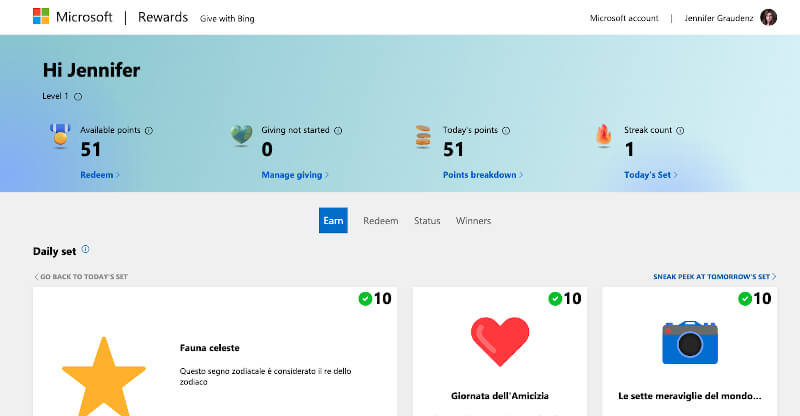
In the Rewards section of your Microsoft account, you can find a daily set of offers. These are three quick web searches that renew every day.
All you need to do is click on the icon to get to the search results. For doing this, you will get 10 points for each task, meaning 30 points in total.
Completing the daily set three days in a row will also give you 45 bonus points.
4. Play Games
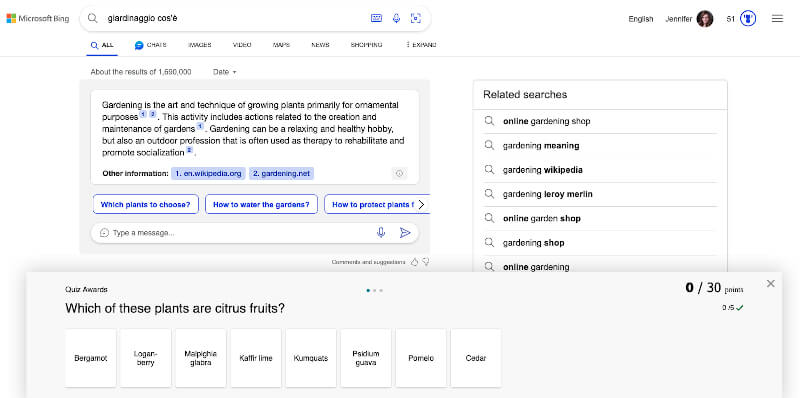
You can also find games in your offers list. There are weekly and daily quizzes that enable you to test your knowledge and accumulate points at the same time.
If you are looking for more ways to earn money from playing games, try the best game apps to make money.
5. Complete Other Tasks
In your Reward section, below the Daily Set, you can find other tasks that award bonus points.
These include some quick web searches, surveys, and tasks associated with getting to know Microsoft Rewards.
Completing each task rewards you with 5 to 50 points and each task can only be completed once.
One of the tasks is to install the Microsoft Rewards browser extension. Installing it is not mandatory to earn points but it enables you to monitor your points at any time.
6. Use an Xbox
If you have an Xbox, you should use it for your Microsoft Rewards account. Connecting it means you will earn more points when you make a purchase.
Though the difference is only minor (double points compared to the normal level 2) so it is not worth buying an Xbox just to get more points.
Note that to earn reward points with your Xbox, you have to download the free Microsoft Rewards app on your Xbox.
How Much Money Can You Make With Microsoft Rewards?
Microsoft Rewards is not a way to great riches. One point equals a whopping $0.001.
As one web search gives you three points, you can make a maximum of $0.75 from web searches if you are a level 2 member.
This would mean making 250 web searches every day. If you do this every day, you will get around $22.00 per month from web searches.
Even if you complete additional tasks, you will struggle to make more than $30.00 per month from Microsoft Rewards.
Of course, you can increase your points by buying products from the Microsoft Store. However, if you have no use for these products, then it is just a waste of money and you will end up with a loss.
What Are the Pros and Cons of Microsoft Rewards?
Microsoft Rewards Review Pros
- Can accumulate points passively from web searches
- Can use the program directly from your Microsoft account, no need to sign-up to a third-party site
- Free to use
Microsoft Rewards Review Cons
- Does not pay well
- You have to use Bing as your search engine
Microsoft Rewards Review Summary
Microsoft Rewards is Microsoft’s loyalty program. You can earn points by searching with Bing and completing tasks. These points can then be redeemed for gift cards or used to purchase Microsoft products.
Overall, Microsoft Rewards does not pay very well for searching the web.
Completing the other tasks is a quick way to boost your balance but it also will not make you rich.
However, the great advantage is that you can accumulate points passively just by using Bing for your web searches.
Thus, if you use Bing frequently, it may be worth signing up to Microsoft Rewards. Equally, if you frequently use your Xbox, Microsoft Reward points can help you save money when buying games.
The program is free so you will not lose anything.
If you like this post, please help My Money Yard grow by sharing it with your friends.